

2026 Valid N10-009 Exam Updates - 2026 Study Guide
N10-009 Certification - The Ultimate Guide [Updated 2026]
NEW QUESTION # 117
A systems administrator is investigating why users cannot reach a Linux web server with a browser but can ping the server IP. The server is online, the web server process is running, and the link to the switch is up. Which of the following commands should the administrator run on the server first?
- A. netstat
- B. tcpdump
- C. arp
- D. traceroute
Answer: A
Explanation:
The netstat command provides information about network connections, routing tables, interface statistics, masquerade connections, and multicast memberships. Running netstat on the server can help the administrator verify that the web server process is listening on the expected port (e.g., port 80 for HTTP or port 443 for HTTPS) and that there are no issues with network connections. This is a crucial first step in diagnosing why the web server is not accessible via a browser.Reference: CompTIA Network+ study materials.
NEW QUESTION # 118
Which of the following is most likely responsible for the security and handling of personal data in Europe?
- A. SCADA
- B. GDPR
- C. SAML
- D. PCI DSS
Answer: B
Explanation:
* Definition of GDPR:
* General Data Protection Regulation (GDPR)is a regulation in EU law on data protection and privacy for all individuals within the European Union and the European Economic Area. It also addresses the transfer of personal data outside the EU and EEA areas.
* Scope and Objectives:
* GDPR aims to give individuals control over their personal data and to simplify the regulatory environment for international business by unifying the regulation within the EU.
* It enforces rules about data protection, requiring companies to protect the personal data and privacy of EU citizens for transactions that occur within EU member states.
* Comparison with Other Options:
* SCADA (Supervisory Control and Data Acquisition):Refers to control systems used in industrial and infrastructure processes, not related to personal data protection.
* SAML (Security Assertion Markup Language):A standard for exchanging authentication and authorization data between parties, not specifically for personal data protection.
* PCI DSS (Payment Card Industry Data Security Standard):A set of security standards designed to ensure that all companies that accept, process, store or transmit credit card information maintain a secure environment, not specific to personal data protection in Europe.
* Key Provisions:
* GDPR includes provisions for data processing, data subject rights, obligations of data controllers and processors, and penalties for non-compliance.
References:
* CompTIA Network+ study materials on regulatory and compliance standards.
NEW QUESTION # 119
Which of the following is most commonly associated with many systems sharing one IP address in the public IP-addressing space?
- A. NAT
- B. NAT64
- C. PAT
- D. VIP
Answer: C
Explanation:
Explanation: Port Address Translation (PAT) allows multiple internal devices to share a single public IP address by assigning each device a unique port number. This is the most common method used in environments where many systems need internet access but there are limited public IP addresses.
NEW QUESTION # 120
SIMULATION
A network administrator has been tasked with configuring a network for a new corporate office.
The office consists of two buildings, separated by 50 feet with no physical connectivity. The configuration must meet the following requirements:
- Devices in both buildings should be able to access the Internet.
- Security insists that all Internet traffic be inspected before entering the network.
- Desktops should not see traffic destined for other devices.
INSTRUCTIONS
Select the appropriate network device for each location. If applicable, click on the magnifying glass next to any device which may require configuration updates and make any necessary changes.
Not all devices will be used, but all locations should be filled.
If at any time you would like to bring back the initial state of the simulation, please click the Reset All button.



Answer:
Explanation:
Devices in both buildings should be able to access the Internet.
Security insists that all Internet traffic be inspected before entering the network.
Desktops should not see traffic destined for other devices.
Here is the corrected layout with explanation:
Building A:
Switch: Correctly placed to connect all desktops.
Firewall: Correctly placed to inspect all incoming and outgoing traffic.
Building B:
Switch: Not needed. Instead, place a Wireless Access Point (WAP) to provide wireless connectivity for laptops and mobile devices.
Between Buildings:
Wireless Range Extender: Correctly placed to provide connectivity between the buildings wirelessly.
Connection to the Internet:
Router: Correctly placed to connect to the Internet and route traffic between the buildings and the Internet.
Firewall: The firewall should be placed between the router and the internal network to inspect all traffic before it enters the network.
Corrected Setup:
Top-left (Building A): Switch
Bottom-left (Building A): Firewall (inspect traffic before it enters the network) Top-middle (Internet connection): Router Bottom-middle (between buildings): Wireless Range Extender Top-right (Building B): Wireless Access Point (WAP) In this corrected setup, the WAP in Building B will connect wirelessly to the Wireless Range Extender, which is connected to the Router. The Router is connected to the Firewall to ensure all traffic is inspected before it enters the network.
Configuration for Wireless Range Extender:
SSID: CORP
Security Settings: WPA2 or WPA2 - Enterprise
Key or Passphrase: [Enter a strong passphrase]
Mode: [Set based on your network plan]
Channel: [Set based on your network plan]
Speed: Auto
Duplex: Auto
With these settings, both buildings will have secure access to the Internet, and all traffic will be inspected by the firewall before entering the network. Desktops and other devices will not see traffic intended for others, maintaining the required security and privacy.
To configure the wireless range extender for security, follow these steps:
SSID (Service Set Identifier):
Ensure the SSID is set to "CORP" as shown in the exhibit.
Security Settings:
WPA2 or WPA2 - Enterprise: Choose one of these options for stronger security. WPA2- Enterprise provides more robust security with centralized authentication, which is ideal for a corporate environment.
Key or Passphrase:
If you select WPA2, enter a strong passphrase in the "Key or Passphrase" field.
If you select WPA2 - Enterprise, you will need to configure additional settings for authentication servers, such as RADIUS, which is not shown in the exhibit.
Wireless Mode and Channel:
Set the appropriate mode and channel based on your network design and the environment to avoid interference. These settings are not specified in the exhibit, so set them according to your network plan.
Wired Speed and Duplex:
Set the speed to "Auto" unless you have specific requirements for 100 or 1000 Mbps.
Set the duplex to "Auto" unless you need to specify half or full duplex based on your network equipment.
Save Configuration:
After making the necessary changes, click the "Save" button to apply the settings.
Here is how the configuration should look after adjustments:
SSID: CORP
Security Settings: WPA2 or WPA2 - Enterprise
Key or Passphrase: [Enter a strong passphrase]
Mode: [Set based on your network plan]
Channel: [Set based on your network plan]
Speed: Auto
Duplex: Auto
Once these settings are configured, your wireless range extender will provide secure connectivity for devices in both buildings.
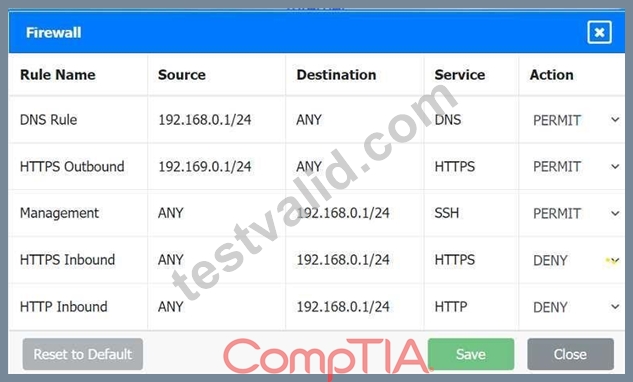
Firewall setting to to ensure complete compliance with the requirements and best security practices, consider the following adjustments and additions:
DNS Rule: This rule allows DNS traffic from the internal network to any destination, which is fine.
HTTPS Outbound: This rule allows HTTPS traffic from the internal network (assuming
192.169.0.1/24 is a typo and should be 192.168.0.1/24) to any destination, which is also good for secure web browsing.
Management: This rule allows SSH access to the firewall for management purposes, which is necessary for administrative tasks.
HTTPS Inbound: This rule denies inbound HTTPS traffic to the internal network, which is good unless you have a web server that needs to be accessible from the internet.
HTTP Inbound: This rule denies inbound HTTP traffic to the internal network, which is correct for security purposes.
Suggested Additional Settings:
Permit General Outbound Traffic: Allow general outbound traffic for web access, email, etc.
Block All Other Traffic: Ensure that all other traffic is blocked to prevent unauthorized access.
Firewall Configuration Adjustments:
Correct the Network Typo:
Ensure that the subnet 192.169.0.1/24 is corrected to 192.168.0.1/24.
Permit General Outbound Traffic:
Rule Name: General Outbound
Source: 192.168.0.1/24
Destination: ANY
Service: ANY
Action: PERMIT
Deny All Other Traffic:
Rule Name: Block All
Source: ANY
Destination: ANY
Service: ANY
Action: DENY
Here is how your updated firewall settings should look:
Rule Name Source Destination Service Action
DNS Rule 192.168.0.1/24 ANY DNS PERMIT
HTTPS Outbound 192.168.0.1/24 ANY HTTPS PERMIT
Management ANY 192.168.0.1/24 SSH PERMIT
HTTPS Inbound ANY 192.168.0.1/24 HTTPS DENY
HTTP Inbound ANY 192.168.0.1/24 HTTP DENY
General Outbound 192.168.0.1/24 ANY ANY PERMIT
Block All ANY ANY ANY DENY
These settings ensure that:
Internal devices can access DNS and HTTPS services externally.
Management access via SSH is permitted.
Inbound HTTP and HTTPS traffic is denied unless otherwise specified.
General outbound traffic is allowed.
All other traffic is blocked by default, ensuring a secure environment.
Make sure to save the settings after making these adjustments.
NEW QUESTION # 121
An IT manager needs to connect ten sites in a mesh network. Each needs to be secured with reduced provisioning time. Which of the following technologies will best meet this requirement?
- A. NFV
- B. VXLAN
- C. SD-WAN
- D. VPN
Answer: C
Explanation:
* Definition of SD-WAN:
* Software-Defined Wide Area Network (SD-WAN) is a technology that simplifies the management and operation of a WAN by decoupling the networking hardware from its control mechanism. It allows for centralized management and enhanced security.
* Benefits of SD-WAN:
* Reduced Provisioning Time:SD-WAN enables quick and easy deployment of new sites with centralized control and automation.
* Security:Incorporates advanced security features such as encryption, secure tunneling, and integrated firewalls.
* Scalability:Easily scales to accommodate additional sites and bandwidth requirements.
* Comparison with Other Technologies:
* VXLAN (Virtual Extensible LAN):Primarily used for network virtualization within data centers.
* VPN (Virtual Private Network):Provides secure connections but does not offer the centralized management and provisioning efficiency of SD-WAN.
* NFV (Network Functions Virtualization):Virtualizes network services but does not specifically address WAN management and provisioning.
* Implementation:
* SD-WAN solutions are implemented by deploying edge devices at each site and connecting them to a central controller. This allows for dynamic routing, traffic management, and security policy enforcement.
References:
* CompTIA Network+ course materials and networking solution guides.
NEW QUESTION # 122
A network administrator notices interference with industrial equipment in the 2.4GHz range. Which of the following technologies would most likely mitigate this issue? (Select two).
- A. Omnidirectional antenna
- B. Non-overlapping channel
- C. Mesh network
- D. 5GHz frequency
- E. Ad hoc network
- F. Captive portal
Answer: D
Explanation:
* Understanding 2.4GHz Interference:
* The 2.4GHz frequency range is commonly used by many devices, including Wi-Fi, Bluetooth, and various industrial equipment. This can lead to interference and degraded performance.
* Mitigation Strategies:
* 5GHz Frequency:
* The 5GHz frequency band offers more channels and less interference compared to the
2.4GHz band. Devices operating on 5GHz are less likely to encounter interference from other devices, including industrial equipment.
* Non-overlapping Channels:
* In the 2.4GHz band, using non-overlapping channels (such as channels 1, 6, and 11) can help reduce interference. Non-overlapping channels do not interfere with each other, providing clearer communication paths for Wi-Fi signals.
* Why Other Options are Less Effective:
* Mesh Network:While useful for extending network coverage, a mesh network does not inherently address interference issues.
* Omnidirectional Antenna:This type of antenna broadcasts signals in all directions but does not mitigate interference.
* Captive Portal:A web page that users must view and interact with before accessing a network, unrelated to frequency interference.
* Ad Hoc Network:A decentralized wireless network that does not address interference issues directly.
* Implementation:
* Switch Wi-Fi devices to the 5GHz band if supported by the network infrastructure and client devices.
* Configure Wi-Fi access points to use non-overlapping channels within the 2.4GHz band to minimize interference.
References:
* CompTIA Network+ study materials on wireless networking and interference mitigation.
NEW QUESTION # 123
A network administrator needs to create a way to redirect a network resource that has been on the local network but is now hosted as a SaaS solution. Which of the following records should be used to accomplish the task?
- A. PTR
- B. AAA
- C. TXT
- D. CNAME
Answer: D
Explanation:
To redirect a network resource that has moved from a local network to a Software-as-a-Service (SaaS) solution, the network administrator needs to configure a DNS record that maps an alias to the new canonical name (hostname) of the SaaS provider's server. The CNAME (Canonical Name) record is used to alias one domain name to another, effectively redirecting requests to the new hostname without needing to update the IP address directly. This is ideal for SaaS solutions, where the provider's server hostname is used, and the IP address may change dynamically.
Why not TXT? A TXT record is used to store arbitrary text data, such as SPF records for email authentication or verification strings, not for redirecting resources.
Why not AAA? There is no such thing as an "AAA" record in DNS. This might be a typo for AAAA (IPv6 address record), but AAAA maps a hostname to an IPv6 address, not an alias.
Why not PTR? A PTR record is used for reverse DNS lookups (mapping an IP address to a hostname), not for redirecting a resource to a new hostname.
NEW QUESTION # 124
Which of the following can be used when a server at a remote site is physically unreachable?
- A. Jump box
- B. Crash cart
- C. Console
- D. OOB management
Answer: D
Explanation:
Out-of-band (OOB) managementallows administrators to manage devices remotely even if the primary network is down. This is especially useful when physical access to the server is not possible. OOB management often uses a separate management interface, ensuring access regardless of the server's operational state.
Reference:
NEW QUESTION # 125
Which of the followingservicesruns onport 636?
- A. LDAPS
- B. Syslog
- C. TFTP
- D. SMTP
Answer: A
Explanation:
Comprehensive and Detailed Explanation:
LDAP over SSL (LDAPS)usesport 636to providesecure, encrypted authenticationfor directory services.
Breakdown of Options:
* A. SMTP (Simple Mail Transfer Protocol)- Usesport 25, not 636.
* B. Syslog- Usesport 514 (UDP),not 636.
* C. TFTP (Trivial File Transfer Protocol)- Usesport 69 (UDP),not 636.
* D. LDAPS (Lightweight Directory Access Protocol Secure)-#Correct answer.Usesport 636for secure directory authentication.
NEW QUESTION # 126
During a security audit, a consulting firm notices inconsistencies between the documentation and the actual environment. Which of the following can keep a record of who made the changes and what the changes are?
- A. Syslog
- B. Zero Trust
- C. Configuration monitoring
- D. Network access control
Answer: C
Explanation:
Configuration monitoring and management tools (often part of network management systems) maintain version-controlled records of device configurations, track changes, and log who made them. This provides accountability and supports compliance audits.
A). Network access control (NAC) manages endpoint access policies but does not track device config changes.
C). Zero Trust is a security framework requiring strict identity verification, not a configuration tracking tool.
D). Syslog collects system logs, but without a config monitoring system, it does not directly compare documentation to device state.
References (CompTIA Network+ N10-009):
Domain: Network Operations - Change management, configuration management, auditing.
NEW QUESTION # 127
A network administrator needs to ensure all network ports use a security method that only permits authenticated devices. The solution must meet the following requirements:
* Reduced chance of spoofing
* Centrally managed solution
* Auditable logs
Which of the following technologies provides this functionality?
- A. MAC filtering
- B. 802.1X
- C. ACLs
- D. Port security
Answer: B
Explanation:
802.1X provides port-based network access control that requires authentication before a switch port grants full network access. It uses a supplicant (client), an authenticator (switch/AP), and an authentication server (commonly RADIUS ) to validate credentials or certificates. This directly supports the requirements: it reduces spoofing compared with MAC-based controls because authentication can be identity- and certificate- based rather than relying on easily forged MAC addresses; it is centrally managed through AAA infrastructure and policy (users/devices/groups); and it produces auditable logs via the authentication server and network devices, enabling accountability and investigation. Network+ security objectives emphasize AAA, NAC, and strong access controls for both wired and wireless networks. MAC filtering and basic port security rely largely on MAC addresses and are susceptible to spoofing; they also tend to be harder to manage at scale and provide weaker centralized auditing. ACLs control traffic flows but do not authenticate endpoints at the port level, so they cannot ensure "only authenticated devices" can connect. Therefore, 802.1X is the technology that best meets all stated requirements.
NEW QUESTION # 128
Which of the following dynamic routing protocols is used on the internet?
- A. OSPF
- B. EIGRP
- C. RIP
- D. BGP
Answer: D
Explanation:
BGP (Border Gateway Protocol)is theonly dynamic routing protocol used across the internet. It's classified as an Exterior Gateway Protocol (EGP), responsible for routing between different autonomous systems (ASes).
* A. EIGRPandD. OSPFare Interior Gateway Protocols (IGPs), used within organizations.
* C. RIPis an outdated IGP with limited use, unsuitable for internet-scale routing.
#Reference:
CompTIA Network+ N10-009 Official Objectives: 3.1 - Compare and contrast various routing technologies.
NEW QUESTION # 129
A network administrator wants users to be able to authenticate to the corporate network using a port-based authentication framework when accessing both wired and wireless devices. Which of the following is the best security feature to accomplish this task?
- A. MAC filtering
- B. 802.1X
- C. Access control list
- D. Port security
Answer: B
Explanation:
802.1X is a port-based network access control (PNAC) protocol that provides an authentication mechanism to devices wishing to connect to a LAN or WLAN. It is widely used for secure network access, ensuring that only authenticated devices can access the network, whether they are connecting via wired or wireless means. 802.1X works in conjunction with an authentication server, such as RADIUS, to validate the credentials of devices trying to connect.
Reference: CompTIA Network+ study materials.
NEW QUESTION # 130
An administrator wants to find the top destination for traffic across the infrastructure on a specific day. Which of the following should the administrator use?
- A. SNMP
- B. NetFlow
- C. Packet capture
- D. traceroute
Answer: B
Explanation:
NetFlow (and similar flow technologies like IPFIX/sFlow in concept) is used to collect traffic-flow metadata such as source/destination IPs, ports, protocols, interfaces, and byte/packet counts over time. In Network+ (N10-009) operations and monitoring objectives, flow data is ideal for identifying top talkers and top destinations across the network on a given day because it provides summarized, queryable information at scale without capturing every packet payload. An administrator can review reports to determine which destination IPs/hosts consumed the most bandwidth, which applications were most active, and what time ranges saw spikes-perfect for historical analysis.
SNMP is great for polling device counters (interface utilization, errors, CPU) but it does not natively tell you the "top destination" by conversation/flow without additional flow awareness. Packet capture can reveal exact conversations and payloads, but it is heavy, localized, and not efficient for infrastructure-wide daily top- destination reporting. traceroute maps the path to a destination and helps isolate routing/path issues; it does not provide usage statistics. Therefore, NetFlow is the best fit.
NEW QUESTION # 131
A small company has the following IP addressing strategy:
A user is unable to connect to the company fileshare server located at 192.168.10.1. The user's networking configuration is:
Which of the following will most likely correct the issue?
- A. Changing the DNS servers to internet IPs
- B. Changing the physical address to 7A-01-7A-21-01-50
- C. Changing the IPv4 address to 192.168.10.1
- D. Changing the subnet mask to 255.255.255.0
Answer: D
Explanation:
If the user cannot communicate with 192.168.10.1, they might be on a different subnet. Changing the subnet mask to 255.255.255.0 ensures the user and the file server are in the same subnet.
Breakdown of Options:
A . Changing the IPv4 address to 192.168.10.1 - This would conflict with the server's IP.
B . Changing the subnet mask to 255.255.255.0 - ✅ Correct answer. Ensures both the user and the server are on the same subnet.
C . Changing the DNS servers - DNS does not affect local network connectivity.
D . Changing the physical address - The MAC address does not impact subnet communication.
Reference:
CompTIA Network+ (N10-009) Official Study Guide - Domain 2.4: Explain subnetting and addressing concepts.
NEW QUESTION # 132
A network engineer needs to order cabling to connect two buildings within the same city. Which of the following media types should the network engineer use?
- A. Twinaxial
- B. Coaxial
- C. Cat 5
- D. Single-mode fiber
Answer: D
Explanation:
Single-mode fiberis best suited forlong-distance communication, often exceeding 10 km (6.2 miles). It's immune to EMI and offers high bandwidth - making it the ideal choice forconnecting buildings across a city.
* Coaxial(A) andTwinaxial(B) are used for shorter distances and specific use cases (e.g., storage or legacy systems).
* Cat 5(D) is limited to 100 meters and is not suitable for city-level interconnects.
#For long-distance, high-speed, and reliable communication between buildings,Single-mode fiberis the professional choice.
NEW QUESTION # 133
Which of the following provides an opportunity for an on-path attack?
- A. Evil twin
- B. Phishing
- C. Tailgating
- D. Dumpster diving
Answer: A
Explanation:
An evil twin is a rogue Wi-Fi access point that mimics a legitimate network. Attackers use it to intercept and manipulate traffic, making it an on-path (formerly MITM) attack opportunity.
Breakdown of Options:
A: Phishing - Tries to steal credentials through fake emails/websites but does not intercept network traffic.
B: Dumpster diving - Involves physical security breaches, not network interception.
C: Evil twin - # Correct answer. A rogue Wi-Fi AP impersonates a real network, allowing traffic interception.
D: Tailgating - Involves physical access security, not network interception.
Reference:
CompTIA Network+ (N10-009) Official Study Guide - Domain 3.3: Explain common network security threats.
NEW QUESTION # 134
......
CompTIA N10-009 Exam Syllabus Topics:
| Topic | Details |
|---|---|
| Topic 1 |
|
| Topic 2 |
|
| Topic 3 |
|
| Topic 4 |
|
| Topic 5 |
|
N10-009 Practice Exam and Study Guides - Verified By TestValid: https://www.testvalid.com/N10-009-exam-collection.html
2026 Updated Verified Pass N10-009 Study Guides & Best Courses: https://drive.google.com/open?id=1VTncrUgFnT18Bulk1rLEcXmGtJJv68BG