

Download Salesforce JS-Dev-101 Mock Test Study Material
JS-Dev-101 Questions Prepare with Learning Information
NEW QUESTION # 48
Refer to the code snippet:
Function getAvailabilityMessage(item) {
If (getAvailability(item)){
Var msg ="Username available";
}
Return msg;
}
A developer writes this code to return a message to user attempting to register a new username. If the username is available, variable.
What is the return value of msg hen getAvailabilityMessage ("newUserName" ) is executed and getAvailability("newUserName") returns false?
- A. "Username available"
- B. "Msg is not defined"
- C. "newUserName"
- D. undefined
Answer: D
NEW QUESTION # 49
A developer imports:
import printPrice from '/path/PricePrettyPrint.js';
What must be true about printPrice for this import to work?
- A. printPrice must be the default export
- B. printPrice must be a multi export
- C. printPrice must be a named export
- D. printPrice must be an all export
Answer: A
Explanation:
________________________________________
Comprehensive and Detailed Explanation From Exact Extract JavaScript Knowledge The syntax:
import printPrice from 'module';
means the module must export its function as a default export:
export default function printPrice() { ... }
Why the others are wrong:
Named exports require curly braces:
import { printPrice } from 'module';
"all export" and "multi export" are not JavaScript terms.
Therefore, printPrice must be the default export.
________________________________________
JavaScript Knowledge Reference (text-only)
Default imports use: import name from 'module'.
Named imports require braces: import { name } from 'module'.
NEW QUESTION # 50
A developer is setting up a new Node.js server with a client library that is built using events and callbacks.
The library:
* Will establish a web socket connection and handle receipt of messages to theserver
* Will be imported with require, and made available with a variable called we.
The developer also wants to add error logging if a connection fails.
Given this info, which code segment shows the correct way to set up a client with two events that listen at execution time?
- A. ws.connect (( ) => {console.log('connected to client'); }).catch((error) => { console.log('ERROR' , error); }};
- B. try{ws.connect (( ) => {console.log('connected to client'); });} catch(error) { console.log('ERROR' ,error); };}
- C. ws.on ('connect', ( ) => {console.log('connected to client'); ws.on('error', (error) => { console.log('ERROR' ,error); });}); C. ws.on ('connect', ( ) => { console.log('connected to client'); }}; ws.on('error', (error) => { console.log('ERROR' , error); }};
Answer: B
NEW QUESTION # 51
function myFunction() {
a = a + b;
var b = 1;
}
myFunction();
console.log(a);
console.log(b);
Which statement is correct?
- A. Both line 02 and 03 are executed, and the variables are hoisted.
- B. Line 08 outputs the variable, but line 09 throws an error.
- C. Line 02 throws a reference error, therefore line 03 is never executed.
- D. Both line 02 and 03 are executed, but the values printed are undefined.
Answer: B
Explanation:
Inside myFunction:
var b is hoisted; initially b is undefined within the function.
Expression a = a + b;:
b is undefined.
a is looked up in the global scope. In non-strict mode, reading an undeclared global gives undefined, then a = a + b becomes a = undefined + undefined → NaN, and assigns global a.
After myFunction(), globally:
a exists and is NaN.
b is not declared globally; the var b was local.
So:
console.log(a); // logs NaN (executed fine)
console.log(b); // ReferenceError: b is not defined
NEW QUESTION # 52
A test searches for:
<button class="blue">Checkout</button>
But the actual HTML is:
<button>Checkout</button>
The test fails because it expects a class that no longer exists.
What type of test outcome is this?
- A. False positive
- B. True positive
- C. False negative
- D. True negative
Answer: C
Explanation:
________________________________________
Comprehensive and Detailed Explanation From Exact Extract JavaScript Knowledge Definitions:
False negative → The test reports a failure even though the feature actually works.
False positive → The test reports success when it should not.
True positive → Correctly identifies something is working.
True negative → Correctly identifies something is not working.
In this scenario:
The checkout button does exist, so the feature works.
The test fails incorrectly, because it is checking for the wrong selector.
That is the definition of a false negative.
________________________________________
JavaScript Knowledge Reference (text-only)
Test outcome classification: false negative = feature works but test fails.
NEW QUESTION # 53
refer to the exhibit.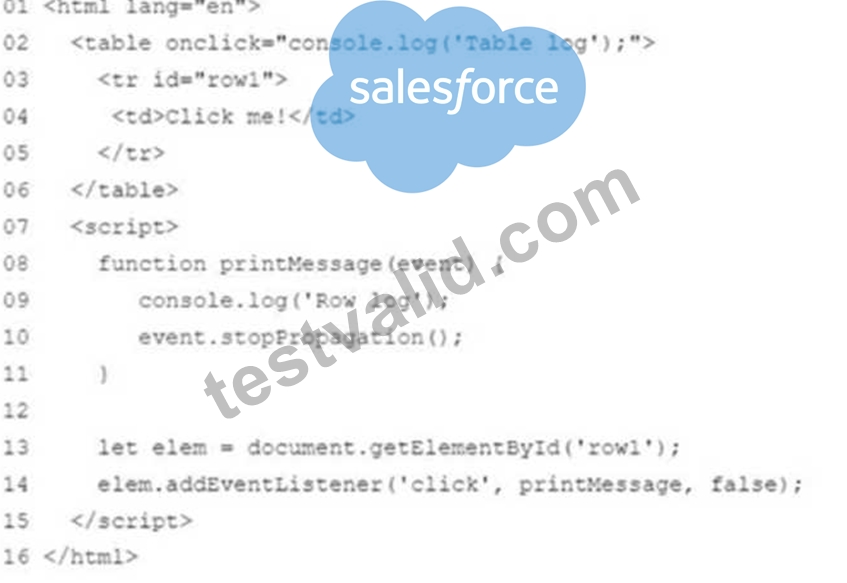
Which code change should be done for the console to log the following when 'Click me!' is clicked' > Row log > Table log
- A. Remove lines 13 and14
- B. Remove line 10
- C. Change line 14 to elem.addEventListener ('click', printMessage, true);
- D. Change line 10 to event.stopPropagation (false) ;
Answer: B
NEW QUESTION # 54
A developer has an ErrorHandler module that contains multiple functions.
What kind of export should be leveraged so that multiple functions can be used?
- A. all
- B. named
- C. default
- D. multi
Answer: B
NEW QUESTION # 55
Given:
const str = 'Salesforce';
Which two statements result in 'Sales'?
- A. str.substring(0, 5);
- B. str.substr(0, 5);
- C. str.substring(1, 5);
- D. str.substr(1, 5);
Answer: A,B
Explanation:
Comprehensive and Detailed Explanation From Exact Extract JavaScript Knowledge:
str = 'Salesforce'
Index positions:
S(0) a(1) l(2) e(3) s(4) f(5) o(6) r(7) c(8) e(9)
substring(start, end)
Start index inclusive, end index exclusive.
str.substring(0, 5) → characters at indices 0-4 → "Sales"
str.substring(1, 5) → indices 1-4 → "ales"
substr(start, length)
Start index, then number of characters.
str.substr(0, 5) → 5 characters starting at index 0 → "Sales"
str.substr(1, 5) → 5 characters from index 1 → "alesf"
So the expressions that return "Sales" are A and C.
________________________________________
NEW QUESTION # 56
Refer to the code below:
01 async function functionUnderTest(isOK) {
02 if (isOK) return 'OK';
03 throw new Error('not OK');
04 }
Which assertion accurately tests the above code?
- A. console.assert(await (functionUnderTest(true), 'not OK'))
- B. console.assert(await functionUnderTest(true), 'not OK')
- C. console.assert(await functionUnderTest(true), 'OK')
- D. console.assert(functionUnderTest(true), 'OK')
Answer: C
Explanation:
Comprehensive and Detailed Explanation From Exact Extract JavaScript knowledge:
The function:
async function functionUnderTest(isOK) {
if (isOK) return 'OK';
throw new Error('not OK');
}
Behavior:
If isOK is true:
The function resolves (fulfills the promise) with value 'OK'.
If isOK is false:
The function throws, which in an async function becomes a rejected promise with Error('not OK').
We want an assertion that accurately tests the successful path for isOK === true.
Key points about console.assert:
Signature: console.assert(condition, message?)
If condition is falsy, it logs message as an assertion failure.
If condition is truthy, nothing is logged.
We also must understand await:
await functionUnderTest(true) will resolve to the string 'OK'.
Now evaluate options.
Option A:
console.assert(await functionUnderTest(true), 'OK');
await functionUnderTest(true) → 'OK' (truthy).
console.assert('OK', 'OK');
Condition is 'OK' (truthy), so assertion passes.
The message 'OK' is only shown if the condition is falsy, which it is not.
This correctly verifies that the promise resolved (i.e., did not reject). Among the given options, this is the only one that both:
Uses await properly on the async function, and
Associates the message with the expected success "OK".
Option B:
console.assert(await (functionUnderTest(true), 'not OK'));
Inside the parentheses, the comma operator (a, b) evaluates a, discards it, and returns b.
So (functionUnderTest(true), 'not OK'):
Calls functionUnderTest(true) (returns a promise, but its result is discarded), The expression evaluates to the string 'not OK'.
Then await 'not OK' just resolves to 'not OK' immediately (not a promise).
console.assert('not OK');
Condition is 'not OK' (truthy), so the assertion passes regardless of what functionUnderTest actually does.
This does not meaningfully test the function and is misleading.
Option C:
console.assert(functionUnderTest(true), 'OK');
functionUnderTest(true) returns a Promise, not the string 'OK' directly.
A Promise object is always truthy.
So console.assert(promise, 'OK') will pass, even if the promise later rejects.
Also, there is no await, so we are not actually waiting for the async result.
This is not a correct way to assert on an async function's resolved value.
Option D:
console.assert(await functionUnderTest(true), 'not OK');
await functionUnderTest(true) still resolves to 'OK' (truthy).
console.assert('OK', 'not OK'); passes.
However, the message 'not OK' is the opposite of what we expect for the success case and is only used when the condition fails.
This makes the assertion logically inconsistent with the function behavior (it would show "not OK" if the assertion failed).
Therefore, the only assertion that:
Properly waits on the async function, and
Has expectation text that matches the successful behavior ('OK')
is:
Study Guide / Concept Reference (no links):
async and await behavior in JavaScript
Promises resolving vs rejecting in async functions
console.assert(condition, message) usage
Truthy and falsy values in JavaScript
Comma operator (a, b) semantics
________________________________________
NEW QUESTION # 57
developer publishes a new version of a package with new features that do not break backward compatibility. The previous version number was 1.1.3.
Following semantic versioning format, what should the new package version number be?
- A. 2.0.0
- B. 1.2.0
- C. 1.1.4
- D. 1.2.3
Answer: A
NEW QUESTION # 58
Refer to the code below:
01 let first = 'Who';
02 let second = 'What';
03 try {
04 try {
05 throw new Error('Sad trombone');
06 } catch (err) {
07 first = 'Why';
08 throw err;
09 } finally {
10 second = 'When';
11 }
12 } catch (err) {
13 second = 'Where';
14 }
What are the values for first and second once the code executes?
- A. first is Why and second is Where.
- B. first is Who and second is When.
- C. first is Who and second is Where.
- D. first is Why and second is When.
Answer: A
Explanation:
Comprehensive and Detailed Explanation From Exact Extract JavaScript Knowledge:
Initial values:
first = 'Who'
second = 'What'
Execution:
Inner try/catch/finally:
Line 05: throw new Error('Sad trombone');
Control goes to the inner catch.
Inner catch (lines 06-08):
catch (err) {
first = 'Why';
throw err;
}
first is set to 'Why'.
The error is rethrown.
Inner finally (lines 09-11):
finally {
second = 'When';
}
finally runs whether or not there was an error.
second becomes 'When'.
After inner finally, the rethrown error continues to propagate to the outer catch.
Outer catch (lines 12-14):
} catch (err) {
second = 'Where';
}
Because the inner try rethrew, the outer catch runs.
It sets second = 'Where'.
Final values:
first was changed to 'Why' in the inner catch and never changed again.
second became 'When' in the inner finally, and then 'Where' in the outer catch.
So:
first is 'Why'
second is 'Where'
Option B is correct.
Concepts: nested try/catch/finally, rethrowing errors, order of execution for catch vs finally, variable mutation through error propagation.
________________________________________
NEW QUESTION # 59
Refer to the code below (corrected to use a template literal on line 08):
01 let car1 = new Promise((_, reject) =>
02 setTimeout(reject, 2000, "Car 1 crashed in")
03 );
04 let car2 = new Promise(resolve =>
05 setTimeout(resolve, 1500, "Car 2 completed")
06 );
07 let car3 = new Promise(resolve =>
08 setTimeout(resolve, 3000, "Car 3 completed")
09 );
10
11 Promise.race([car1, car2, car3])
12 .then(value => {
13 let result = `${value} the race.`;
14 })
15 .catch(err => {
16 console.log("Race is cancelled.", err);
17 });
What is the value of result when Promise.race executes?
- A. Car 1 crashed in the race.
- B. Race is cancelled.
- C. Car 2 completed the race.
- D. Car 3 completed the race.
Answer: C
Explanation:
Comprehensive and Detailed Explanation From Exact Extract JavaScript knowledge:
Understand the three promises:
car1:
let car1 = new Promise((_, reject) =>
setTimeout(reject, 2000, "Car 1 crashed in")
);
Rejects after 2000 ms (2 seconds) with message "Car 1 crashed in".
car2:
let car2 = new Promise(resolve =>
setTimeout(resolve, 1500, "Car 2 completed")
);
Resolves after 1500 ms (1.5 seconds) with message "Car 2 completed".
car3:
let car3 = new Promise(resolve =>
setTimeout(resolve, 3000, "Car 3 completed")
);
Resolves after 3000 ms (3 seconds) with message "Car 3 completed".
Promise.race:
Promise.race([car1, car2, car3])
.then(value => {
let result = `${value} the race.`;
})
.catch(err => {
console.log("Race is cancelled.", err);
});
Behavior of Promise.race:
It settles (resolves or rejects) as soon as any of the given promises settles.
It uses the value or reason from the first settled promise.
Timing:
car2 resolves in 1500 ms.
car1 rejects in 2000 ms.
car3 resolves in 3000 ms.
The first to settle is car2 at 1500 ms, with value "Car 2 completed".
Therefore:
Promise.race resolves (not rejects) with value = "Car 2 completed".
The .then handler runs; .catch is ignored because there is no rejection.
Inside .then:
let result = `${value} the race.`;
Substitute value:
let result = "Car 2 completed the race.";
So, result becomes:
Car 2 completed the race.
Compare to options:
A . Car 3 completed the race.
This would be correct if car3 were the first to resolve, which it is not (it resolves last).
B . Car 2 completed the race.
Exactly matches the first-resolving promise and the constructed message.
C . Race is cancelled.
This is the prefix of the string logged in the .catch handler, but .catch never runs because the race resolves, it does not reject first.
D . Car 1 crashed in the race.
car1 is the first rejection, but since a resolution from car2 happens earlier, the race is already settled successfully before car1 rejects.
Thus the correct value of result as set in the .then block is:
Answe r: B
Study Guide / Concept Reference (no links):
Promise.race(iterable) semantics (first settled promise wins)
setTimeout and timing interactions with Promises
Resolve vs reject paths and .then / .catch
Template literals and string interpolation for building result messages
NEW QUESTION # 60
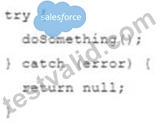
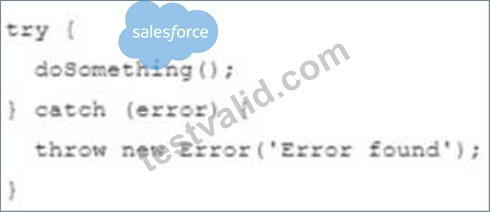
A developer is trying to handle an error within a function.
Which code segment shows the correct approach to handle an error without propagating it elsewhere?
- A.
- B.
- C.
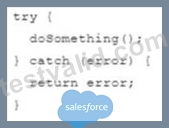
- D.
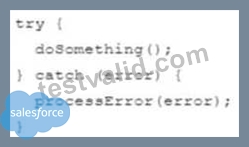
Answer: D
NEW QUESTION # 61
Which statement accurately describes an aspect of promises?
- A. .then() manipulates and returns the original promise.
- B. In a.then() function, returning results is not necessary since callbacks will catch the result of a previous promise.
- C. Arguments for the callback function passed to .then() are optional.
- D. .then() cannot be added after a catch.
Answer: C
NEW QUESTION # 62
Refer to the code below:
Let inArray =[ [ 1, 2 ] , [ 3, 4, 5 ] ];
Which two statements result in the array [1, 2, 3, 4, 5] ?
Choose 2 answers
- A. []. Concat (... inArray);
- B. [ ]. concat ( [ ....inArray ] );
- C. [ ]. Concat.apply ([ ], inArray);
- D. [ ]. concat.apply(inArray, [ ]);
Answer: A,C
NEW QUESTION # 63
......
Salesforce JS-Dev-101 Exam Syllabus Topics:
| Topic | Details |
|---|---|
| Topic 1 |
|
| Topic 2 |
|
| Topic 3 |
|
| Topic 4 |
|
| Topic 5 |
|
| Topic 6 |
|
Most Reliable Salesforce JS-Dev-101 Training Materials: https://www.testvalid.com/JS-Dev-101-exam-collection.html
Practice Material for JS-Dev-101 Exam Question Preparation: https://drive.google.com/open?id=1fOZT3Yugm-G6vg_xjuCPwgZGS4XDLXjc