

2024 Valid MS-102 Real Exam Questions, practice Microsoft 365 Certified
Latest Success Metrics For Actual MS-102 Exam (Updated 402 Questions)
NEW QUESTION # 88
You have a Microsoft 365 E5 subscription.
You plan to implement Microsoft Purview policies to meet the following requirements:
Identify documents that are stored in Microsoft Teams and SharePoint that contain Personally Identifiable Information (PII).
Report on shared documents that contain PII.
What should you create?
- A. a Microsoft Defender for Cloud Apps policy
- B. a retention policy
- C. a data loss prevention (DLP) policy
- D. an alert policy
Answer: C
Explanation:
Explanation
Demonstrate data protection
Protection of personal information in Microsoft 365 includes using data loss prevention (DLP) capabilities.
With DLP policies, you can automatically protect sensitive information across Microsoft 365.
There are multiple ways you can apply the protection. Educating and raising awareness to where EU resident data is stored in your environment and how your employees are permitted to handle it represents one level of information protection using Office 365 DLP.
In this phase, you create a new DLP policy and demonstrate how it gets applied to the IBANs.docx file you stored in SharePoint Online in Phase 2 and when you attempt to send an email containing IBANs.
From the Security & Compliance tab of your browser, click Home.
Click Data loss prevention > Policy.
Click + Create a policy.
In Start with a template or create a custom policy, click Custom > Custom policy > Next.
In Name your policy, provide the following details and then click Next: a. Name: EU Citizen PII Policy b. Description: Protect the personally identifiable information of European citizens Etc.
Reference:
https://learn.microsoft.com/en-us/compliance/regulatory/gdpr-discovery-protection-reporting-in-office365-dev-te
NEW QUESTION # 89
You have a Microsoft 365 subscription that contains a user named User1 and a Microsoft SharePoint Online site named Site1. User1 is assigned the Owner role for Site1. To Site1, you publish the file plan retention labels shown in the following table.
Site1 contains the files shown in the following table.
Which files can User1 rename, and which files can User1 delete? To answer, select the appropriate options in the answer area.
NOTE: Each correct selection is worth one point.
Answer:
Explanation:
Explanation
NEW QUESTION # 90
HOTSPOT
You have a Microsoft 365 E5 subscription that contains a Microsoft SharePoint site named Site1 and a data loss prevention (DLP) policy named DLP1. DLP1 contains the rules shown in the following table.
Site1 contains the files shown in the following table.
Which policy tips are shown for each file? To answer, select the appropriate options in the answer area.
NOTE: Each correct selection is worth one point.
Answer:
Explanation:
Explanation
Box 1: Rule1 tip only
File1 matches Rule1, Rule2, and Rule3.
Rule1 has the highest priority.
Note: The Priority parameter specifies a priority value for the policy that determines the order of policy processing. A lower integer value indicates a higher priority, the value 0 is the highest priority, and policies can't have the same priority value.
Box 2: Rule1 tip only
Note: User Override support
The option to override is per rule, and it overrides all of the actions in the rule (except sending a notification, which can't be overridden).
It's possible for content to match several rules in a DLP policy or several different DLP policies, but only the policy tip from the most restrictive, highest-priority rule will be shown (including policies in Test mode). For example, a policy tip from a rule that blocks access to content will be shown over a policy tip from a rule that simply sends a notification. This prevents people from seeing a cascade of policy tips.
If the policy tips in the most restrictive rule allow people to override the rule, then overriding this rule also overrides any other rules that the content matched.
Reference:
https://learn.microsoft.com/en-us/microsoft-365/compliance/dlp-overview-plan-for-dlp
https://learn.microsoft.com/en-us/microsoft-365/compliance/use-notifications-and-policy-tips
NEW QUESTION # 91
DRAG DROP
You have a Microsoft 365 E5 subscription that contains two groups named Group1 and Group2.
You need to ensure that each group can perform the tasks shown in the following table.
The solution must use the principle of least privilege.
Which role should you assign to each group? To answer, drag the appropriate roles to the correct groups. Each role may be used once, more than once, or not at all. You may need to drag the split bar between panes or scroll to view content.
NOTE: Each correct selection is worth one point.
Answer:
Explanation:
Box 1: Billing admin
manage service request
Purchase new services
Etc.
Assign the Billing admin role to users who make purchases, manage subscriptions and service requests, and monitor service health.
Box 2: User admin
User admin
Assign the User admin role to users who need to do the following for all users:
- Add users and groups
- Assign licenses
- Manage most users properties
- Create and manage user views
- Update password expiration policies
- Manage service requests
- Monitor service health
Reference:
https://learn.microsoft.com/en-us/microsoft-365/admin/add-users/about-admin-roles
NEW QUESTION # 92
From the Security & Compliance admin center, you create a content export as shown in the exhibit. (Click the Exhibit tab.)
What will be excluded from the export?
- A. an 80-MB PPTX file
- B. a 5-MB MP3 file
- C. a 5-KB RTF file
- D. a 10-MB XLSX file
Answer: B
Explanation:
Explanation
Unrecognized file formats are excluded from the search.
Certain types of files, such as Bitmap or MP3 files, don't contain content that can be indexed. As a result, the search indexing servers in Exchange and SharePoint don't perform full-text indexing on these types of files.
These types of files are considered to be unsupported file types.
Reference:
https://docs.microsoft.com/en-us/microsoft-365/compliance/partially-indexed-items-in-content-search?view=o36
https://docs.microsoft.com/en-us/office365/securitycompliance/export-a-content-search-report
NEW QUESTION # 93
HOTSPOT
You have a Microsoft 365 E5 subscription.
From Azure AD Identity Protection on August 1, you configure a Multifactor authentication registration policy that has the following settings:
Assignments: All users
Controls: Require Azure AD multifactor authentication registration
Enforce Policy: On
On August 3, you create two users named User1 and User2.
Users authenticate by using Azure Multi-Factor Authentication (MFA) for the first time on the dates shown in the following table.
By which dates will User1 and User2 be forced to complete their Azure MFA registration? To answer, select the appropriate options in the answer area.
NOTE: Each correct selection is worth one point.
Answer:
Explanation:
Explanation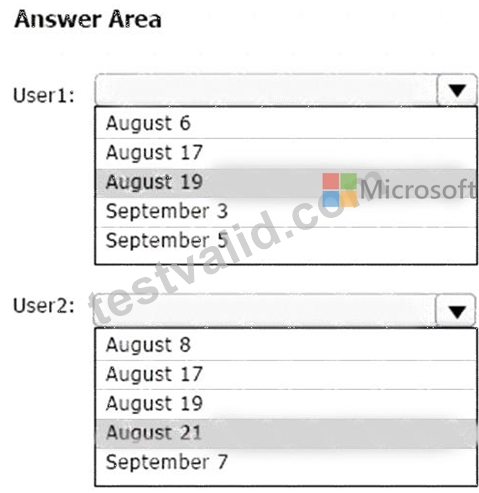
Box 1: August 19
Note: Security defaults will trigger a 14 day grace period for registration after a user's first login and security defaults being enabled. After 14 days users will be required to register for MFA and will not be able to skip.
Conditional Access by itself without Azure Identity Protection does not allow for the 14 day grace period.
Identity Protection includes the registration policy that allows registration on its own with no apps assigned to the policy. If a Conditional Access policy requires Multi-Factor Authentication, then the user must be able to pass that MFA request.
Box 2: August 21
Reference:
https://learn.microsoft.com/en-us/azure/active-directory/identity-protection/overview-identity-protection
NEW QUESTION # 94
You have a Microsoft 365 E5 subscription that uses Microsoft Defender for Endpoint.
When users attempt to access the portal of a partner company, they receive the message shown in the following exhibit.
You need to enable user access to the partner company's portal.
Which Microsoft Defender for Endpoint setting should you modify?
- A. Alert suppression
- B. Alert notifications
- C. Custom detections
- D. Indicators
- E. Advanced hunting
Answer: D
Explanation:
Explanation
This Website Is Blocked By Your Organization
Custom indicators will block malicious IPs, URLs, and domains. Then, they will display the above message for the user.
Reference:
https://jadexstrategic.com/web-protection/
NEW QUESTION # 95
You have a Microsoft 365 tenant.
You need to create a custom Compliance Manager assessment template.
Which application should you use to create the template, and in which file format should the template be saved? To answer, select the appropriate options in the answer area.
NOTE: Each correct selection is worth one point.
Answer:
Explanation:
Explanation
Reference:
https://docs.microsoft.com/en-us/microsoft-365/compliance/compliance-manager-templates-create?view=o365-w
NEW QUESTION # 96
You have a Microsoft 365 E5 subscription that uses Microsoft Defender for Cloud Apps.
You need to be notified when a single user downloads more than 50 files during any 60-second period.
What should you configure?
- A. a session policy
- B. an anomaly detection policy
- C. a file policy
- D. an activity policy
Answer: B
NEW QUESTION # 97
You have a Microsoft 365 E5 subscription that contains the users shown in the following table.
In Microsoft Endpoint Manager, you have the Policies for Office apps settings shown in the following table.
The policies use the settings shown in the following table.
For each of the following statements, select Yes if the statement is true. Otherwise, select No.
NOTE: Each correct selection is worth one point.
Answer:
Explanation:
Explanation
Graphical user interface, text, application Description automatically generated
Reference:
https://docs.microsoft.com/en-us/deployoffice/overview-office-cloud-policy-service
NEW QUESTION # 98
You have a Microsoft 365 E3 subscription that uses Microsoft Defender for Endpoint Plan 1.
Which two Defender for Endpoint features are available to the subscription? Each correct answer presents part of the solution.
NOTE: Each correct selection is worth one point.
- A. security reports
- B. attack surface reduction (ASR)
- C. device discovery
- D. advanced hunting
- E. digital certificate assessment
Answer: A,B
Explanation:
Explanation
B: Overview of Microsoft Defender for Endpoint Plan 1, Reporting
The Microsoft 365 Defender portal (https://security.microsoft.com) provides easy access to information about detected threats and actions to address those threats.
The Home page includes cards to show at a glance which users or devices are at risk, how many threats were detected, and what alerts/incidents were created.
The Incidents & alerts section lists any incidents that were created as a result of triggered alerts. Alerts and incidents are generated as threats are detected across devices.
The Action center lists remediation actions that were taken. For example, if a file is sent to quarantine, or a URL is blocked, each action is listed in the Action center on the History tab.
The Reports section includes reports that show threats detected and their status.
E: What can you expect from Microsoft Defender for Endpoint P1?
Microsoft Defender for Endpoint P1 is focused on prevention/EPP including:
Next-generation antimalware that is cloud-based with built-in AI that helps to stop ransomware, known and unknown malware, and other threats in their tracks.
(E) Attack surface reduction capabilities that harden the device, prevent zero days, and offer granular control over access and behaviors on the endpoint.
Device based conditional access that offers an additional layer of data protection and breach prevention and enables a Zero Trust approach.
The below table offers a comparison of capabilities are offered in Plan 1 versus Plan 2.
Incorrect:
Not A: P2 is by far the best fit for enterprises that need an EDR solution including automated investigation and remediation tools, advanced threat prevention and threat and vulnerability management (TVM), and hunting capabilities.
Reference:
https://learn.microsoft.com/en-us/microsoft-365/security/defender-endpoint/defender-endpoint-plan-1
https://techcommunity.microsoft.com/t5/microsoft-defender-for-endpoint/microsoft-defender-for-endpoint-plan-
NEW QUESTION # 99
You have a Microsoft 365 ES tenant.
You have the alerts shown in the following exhibit.
Use the drop-down menus to select the answer choice that completes each statement based on the information presented in the graphic.
NOTE: Each correct selection is worth one point.
Answer:
Explanation:
Explanation
NEW QUESTION # 100
You have a Microsoft 365 E5 tenant that contains the users shown in the following table.
The tenant contains the devices shown in the following table.
You have the apps shown in the following table.
You plan to use Microsoft Endpoint Manager to manage the apps for the users.
For each of the following statements, select Yes if the statement is true. Otherwise, select No.
NOTE: Each correct selection is worth one point.
Answer:
Explanation:
Graphical user interface, text, application Description automatically generated
Reference:
https://docs.microsoft.com/en-us/mem/intune/apps/apps-deploy
https://docs.microsoft.com/en-us/mem/intune/apps/apps-windows-10-app-deploy
NEW QUESTION # 101
HOTSPOT
Your company uses Microsoft Defender for Endpoint. Microsoft Defender for Endpoint includes the device groups shown in the following table.
You onboard a computer named computer1 to Microsoft Defender for Endpoint as shown in the following exhibit.
Use the drop-down menus to select the answer choice that completes each statement.
NOTE: Each correct selection is worth one point.
Answer:
Explanation:
Box 1: Group3 and Group4 only
Computer1 has no Demo Tag.
Computer1 is in the adatum domain and OS is Windows 10.
Box 2: Group1, Group2, Group3 and Group4
NEW QUESTION # 102
Your company has a Microsoft 365 subscription that uses an Azure AD tenant named contoso.com. The tenant contains the users shown in the following table.
You create a retention label named Label 1 that has the following configurations:
* Retains content for five years
* Automatically deletes all content that is older than five years
You turn on Auto labeling for Label1 by using a policy named Policy1. Policy1 has the following configurations:
* Applies to content that contains the word Merger
* Specifies the OneDrive accounts and SharePoint sites locations
You run the following command.
Set-RetentionConpliancePolicy Policy1 -RestrictiveRetention Strue -Force For each of the following statements, select Yes if the statement is true. Otherwise, select No.
NOTE: Each correct selection is worth one point.
Answer:
Explanation:
Explanation
NEW QUESTION # 103
You have a Microsoft 365 E5 tenant.
You need to evaluate compliance with European Union privacy regulations for customer data.
What should you do in the Microsoft 365 compliance center?
- A. Create a Data Subject Request (DSR)
- B. Create an assessment based on the EU GDPR assessment template
- C. Create an assessment based on the Data Protection Baseline assessment template
- D. Create a data loss prevention (DLP) policy for General Data Protection Regulation (GDPR) data
Answer: B
Explanation:
Reference:
https://docs.microsoft.com/en-us/compliance/regulatory/gdpr-action-plan
NEW QUESTION # 104
You have a Microsoft 365 E5 subscription.
You plan to use a mailbox named Mailbox1 to analyze malicious email messages.
You need to configure Microsoft Defender for Office 365 to meet the following requirements:
* Ensure that incoming email is NOT filtered for Mailbox1.
* Detect impersonation and spoofing attacks on all other mailboxes in the subscription.
Which two settings should you configure? To answer, select the appropriate settings in the answer area.
Answer:
Explanation:
Safe Attachments policy: This policy allows you to specify how to handle email attachments that might contain malware. You can create a custom policy for Mailbox1 and set the action to Do not scan attachments. This will ensure that incoming email is not filtered for Mailbox1. You can also enable the Redirect attachment option to send a copy of the original attachment to another mailbox for analysis1.
Anti-phishing policy: This policy helps you protect your organization from impersonation and spoofing attacks. You can create a default policy for all other mailboxes in the subscription and enable the following features: Impersonation protection, Spoof intelligence, and Domain authentication. These features will help you detect and block emails that try to impersonate your users, domains, or trusted senders2.
NEW QUESTION # 105 
The SP800 assessment has the improvement actions shown in the following table.
Answer:
Explanation:
Explanation
NEW QUESTION # 106
You have a Microsoft 365 subscription that contains the users shown in the following table.
You plan to use Exchange Online to manage email for a DNS domain.
An administrator adds the DNS domain to the subscription.
The DNS domain has a status of Incomplete setup.
You need to identify which user can complete the setup of the DNS domain. The solution must use the principle of least privilege.
Which user should you identify?
- A. User4
- B. User2
- C. User3
- D. User1
Answer: D
NEW QUESTION # 107
......
Microsoft MS-102 Exam Syllabus Topics:
| Topic | Details |
|---|---|
| Topic 1 |
|
| Topic 2 |
|
| Topic 3 |
|
| Topic 4 |
|
| Topic 5 |
|
| Topic 6 |
|
| Topic 7 |
|
Genuine MS-102 Exam Dumps Free Demo Valid QA's: https://www.testvalid.com/MS-102-exam-collection.html
Printable & Easy to Use Microsoft 365 Certified MS-102 Dumps 100% Same Q&A In Your Real Exam: https://drive.google.com/open?id=1TT-_cOAHU_DjlGCUNVUtCAHwbgHrztzA